


 Deal
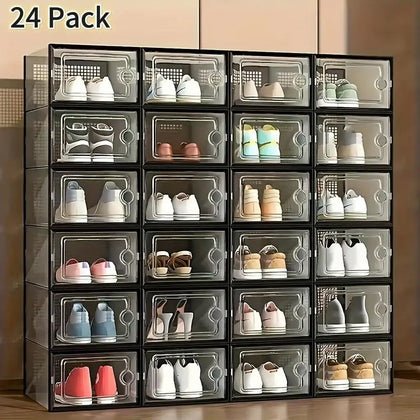
12/24-Piece Modular Stackable Shoe Storage Boxes – Transparent Plastic Sneaker Display Case with Lids, Large Capacity Organizer
Now $69.95
Deal
12/24-Piece Modular Stackable Shoe Storage Boxes – Transparent Plastic Sneaker Display Case with Lids, Large Capacity Organizer
Now $69.95







 Help Center










Share


USB Mini Mouse Mover / Jiggler – Plug & Play Computer Activity Simulator with On/Off Button
Availability:
In Stock
Now
$29.95
$34.95
You save
$5.00
Standard Shipping $4.99
30-Day Returns
|
Fast Guest Checkout
Hurry, only 111 item(s) left in stock!

Delivery
Arrives in 3–8 business days

30-Day Easy Returns
Hassle-free returns within 30 days.

Secure Checkout
100% safe & encrypted checkout.
Couldn't load pickup availability
Shipping & Delivery
Enjoy free shipping on orders over $29.99. A flat $4.99 shipping fee applies to smaller orders.
Shipping & Delivery
Things to Keep in Mind
Things to Keep in Mind
Returns Policy
Most new and unopened items qualify for returns within 30 days of delivery.
Eligible return shipping costs are covered by us. Certain items, including custom products, limited editions, hygiene-sensitive items, oversized items, and final sale products, may not be eligible for return.
Refund Timeline
Most refunds are completed within 5–7 business days after the returned item is received and inspected.
This timeline may include:
- 5–10 business days for return transit
- 3–5 business days for inspection and processing
- 5–10 business days for your bank to finalize the refund
How to Return an Item
To start a return, please visit your account and go to your order history. Once your request is submitted, you will receive an update by email after the return is reviewed and processed.
Shipping Information
We currently ship within the United States.
Free shipping is available on orders of $29.99 or more. Orders below $29.99 are subject to a flat $4.99 shipping fee.
Orders are typically processed within 1–2 business days. Estimated delivery times shown on product pages reflect both processing time and transit time.
Minor delays may occur due to carrier or weather conditions.

USB Mini Mouse Mover / Jiggler – Plug & Play Computer Activity Simulator with On/Off Button
$29.95
Why Customers Choose PulinGO

Carefully Selected Products
Curated for quality, value, and everyday practicality.

Fast & Reliable Delivery
Tracked shipping across the U.S. with clear delivery estimates.

Real Customer Support
Helpful human support before and after your purchase.
Keep Your System Active. Effortlessly. 🔁
Introducing the USB Mini Mouse Mover / Jiggler — a compact plug-and-play device that simulates mouse activity to prevent screen lock, sleep mode or inactivity time-outs. Ideal for technicians, long processing tasks or any workstation that needs to stay awake without constant manual input.
Why It Works Smart 💡
- Plug & Play USB Design: No drivers required — just plug into any USB port, hit the on/off button and go.
- Invisible Mouse Movement: Simulates subtle cursor actions that help keep your status “active”. According to Wikipedia, a mouse jiggler is “a device … used to make it seem as though a computer mouse is moving” to prevent sleep mode. :contentReference[oaicite:0]{index=0}
- Compact & Versatile: Fits easily behind monitors, under desks or into kiosks — suitable for PCs, laptops and workstations.
- On/Off Switch For Control: Easily shut it off when real input is needed, or enable for long tasks or monitoring sessions.
Use-Cases & Benefits 🛠️
Whether you’re uploading large files, processing data overnight or simply need your screen to stay active in a presentation — this device lets you step away without worrying about your session ending. As one user on Reddit put it: > “It’s a mouse mover. Just keeping your screen awake & your status active without you actually being at your desk.” :contentReference[oaicite:1]{index=1}
Setup Instructions 🎛️
1. Insert the device into an available USB-A port.
2. Press the On/Off button to activate.
3. Ensure the cursor is free to move or place the device next to the mouse sensor.
4. When you return, switch it off and resume normal input.
🔌 Ready to stay active without staying docked?
👉 Add this USB Mini Mouse Mover/Jiggler to your cart and ensure your system stays awake even when you're on the move.